Unknown's avatar

DITA is here to stay

or better said… to grow with us

It is seldom that I hear news about XML/DITA application in the DACH region (the German-speaking countries), so I was glad to attend the TIM Users Conference in Constance last week. TIM is the XML authoring and content management system developed by Fischer Computertechnik.

The two-day conference was indeed an intensive knowledge exchange between TIM users, the FCT team, and their partners. As I expected, most of the attendees and speakers are using TIM in manufacturing and machine building enterprises, as well as on-site support services. Adobe FrameMaker and Microsoft Word are still broadly used as editors, but it is encouraging to hear about well established German tools joining the DITA world.

Last year I was reading in the DITA community about concerns that the standard was not being supported enough in Germany, but I must say it does not look that bad to me. As long as DITA is on academic curricula and major conference programs, no one can say it’s being discouraged. New and well-known, local CMS providers are offering and promoting DITA modules. When corporations as large as SAP are adopting a standard, the rest of the world has to follow.

As Prof. Wolfgang Ziegler was saying at tekom 2013 in Wiesbaden during his talk about information portals, DITA and XML have been around for 20 years… we don’t even talk about reasons for doing XML anymore – we just do it! (“Macht man einfach!“)

Prof. Sissi Closs is also talking regularly about DITA and single sourcing. In Constance she was presenting DITA Information Architecture as a relatively new and absolutely necessary discipline, functioning as a continuous, agile process of information management.

Dr. Walter Fischer was declaring himself convinced by the advantages DITA brings to the technical communication, especially considering what the Internet of Things triggers in the emerging Industry 4.0 age.

In workshops, presentations, lightning talks, over coffee, football 😉 WM public viewing or on a boat trip on Lake Constance, “TIM-players” from Austria, Switzerland and Germany were in agreement: We need more collaboration with industry partners, when it comes to exchanging content and integrating tools. Partner content providers are hiding behind a copyright clause and would only send a PDF or a protected copy of an illustration, instead of sharing the sources with integrators of their products and documentation.

Machines are talking to machines and to humans, yet humans are still reluctant to comply to standards and to exchange information. XML is everywhere around us anyway, so why do we have to wait and be forced to switch at the last moment, when it’s obvious we need to work with a standard like DITA, to collaborate and manage information?

Darwin is in the DITA name for a reason: it’s an XML standard that’s evolving with us.

Happy DIT’ing!
Unknown's avatar

Link management in DITA

One of the power features of the DITA environment is the linking mechanism. Combined with keys and conditioning, it gives single-source projects unexpected dimensions.

You can steer your linking strategy from the main ditamap of the deliverable in a clean, non-intrusive manner. The topics remain “neutral”, reusable in any number of projects. The content can be reassembled to fit different use cases, audiences, media, just by manipulating the topics hierarchy and the relationship table in the ditamap, without actually touching the topics. And another piece of good news: no more manually maintaining those miniTOCs…

The following examples are created in oXygen Editor v16, and generated using the PDF and the WebHelp scenarios. By integrating your customized plugins for the DITA Open Toolkit, you can further adjust the look and feel of the publications.

Based on the topics nesting in the ditamap, and eventually the collection-type attribute, your publishing scenario can generate links between parent and children topics, links between sibling topics, and links to next, previous and prerequisite topics in a sequence.

The result also depends on how you set the parameter for related links in the publishing scenario or build script. To display the collection links, set the args.rellinks parameter to "all". If set to "nofamily", only the link to the parent topic is displayed, apart from the links generated from the relationship table.

You should also consider, whether you want your plugin to show or hide the short descriptions, and to group the links under a generic Related links label (makes sense to me), or to display the links by topic type: Related concepts, Related tasks, Related information, etc.

Let’s see a few examples of publishing from a ditamap with topics A, B, C, nested under an overview topic. Remember: You add all these links without modifying the topics source!

Example 1: Simple nesting

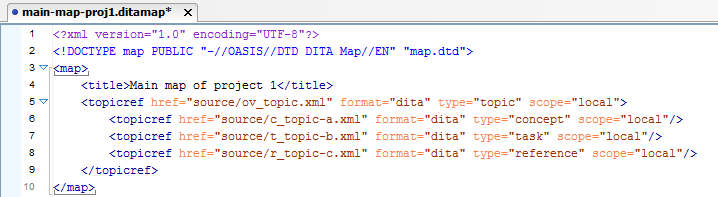
Map sample with simple nesting

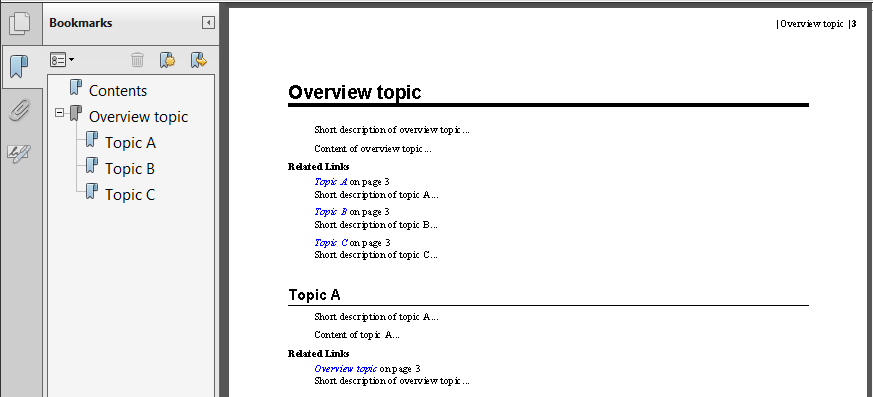
Output: In the PDF, the overview topic (parent) has links to the nested topics (children), and the children link to the parent.

PDF from simple nesting

Example 2: A family collection

Replace line 5 in the map with:
<topicref href="source/ov_topic.xml" format="dita" type="topic" scope="local" collection-type="family">

Output: The parent has links to the children; the children link to the parent and to each other.

PDF with family collection

Example 3: A sequence collection

Replace line 5 in the map with:
<topicref href="source/ov_topic.xml" format="dita" type="topic" scope="local" collection-type="sequence">

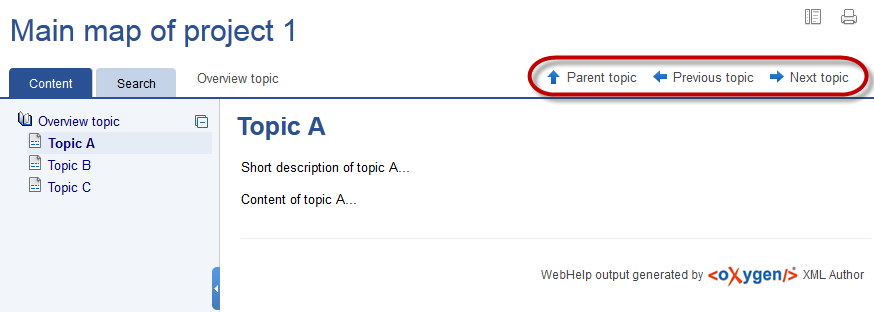
Output: Let’s look at the WebHelp output, this time. The parent has links to the children in an ordered list; the children have links to the parent, to the previous and to the next sibling.

WebHelp output of sequence parent
WebHelp sequence child

Example 4: A required task in the sequence collection

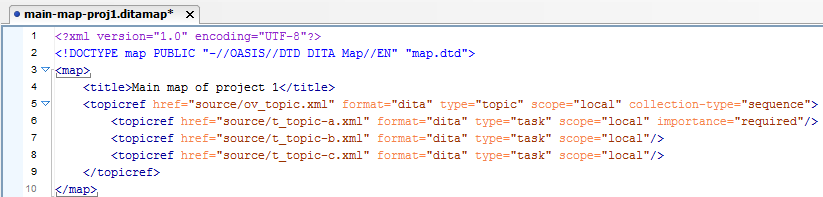
Add the importance attribute to a required task in a sequence (line 6).
Sample with required task in sequence

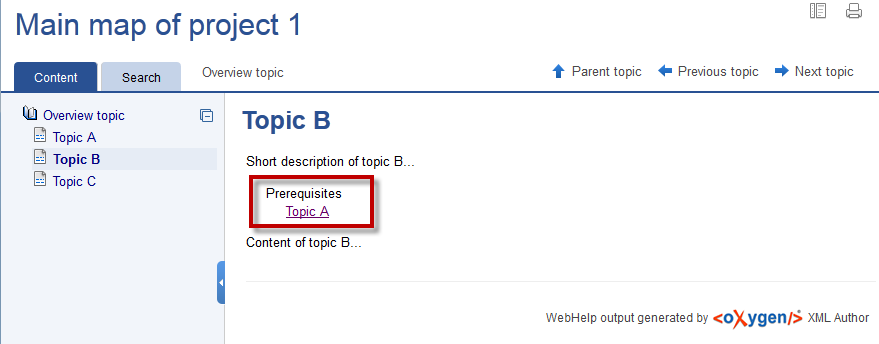
Output: The second and third topics contain a link to the first task, as prerequisite.

WebHelp sequence with prerequisite

To manage the linking between topics that are not hierarchically linked, create a relationship table at the end of the main ditamap of your deliverable. Remember, the map hierarchy also creates certain links, so you should avoid duplicates.

There are more types of relationship tables (reltable), but I prefer staying with the two-column reltable, which allows me to think of links as unidirectional or bidirectional arrows between the two cells of each row.

Apart from linking to DITA topics (concept, task, reference, etc.), you can use the reltable to add links from a topic to external sources, such as web pages or other PDFs.

Example 5: Relationship table

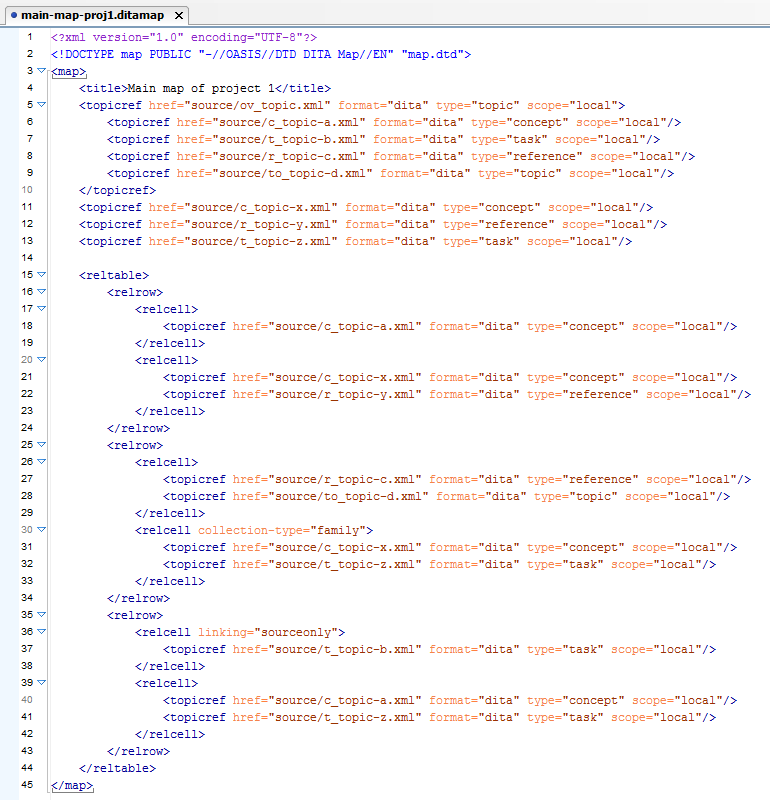
A ditamap with topics A, B, C, D, nested under an overview topic, followed by topics X, Y, Z, and a relationship table.

ditamap with reltable

The example reltable contains three rows:

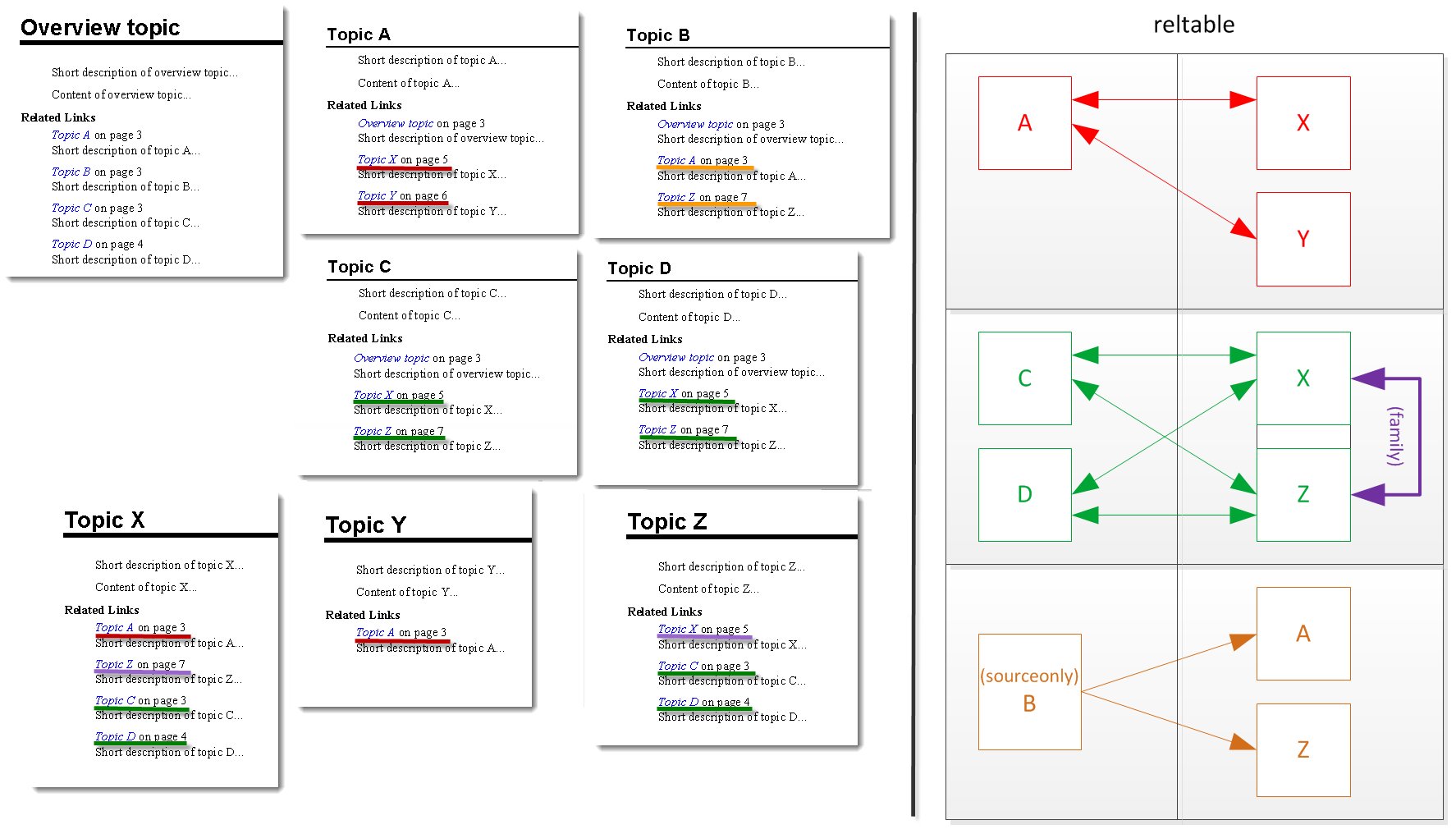
  • The first row relates topic A to topics X and Y.
  • The second row relates topics C and D with topics X and Z, while X and Z are also grouped in a family (line 30), so they would also link to each other.
  • The last row defines a sourceonly relation (line 36) from topic B to topics A and Z, which means A and Z will not link back to B.

I marked the related links in the published topics in red, green, purple and yellow, so you can identify them in the stylized reltable on the right.

PDF topics with links from reltable
To take advantage of these linking mechanisms, the authors in your team have to agree on writing topics for reuse, organizing the cross-references in the reltable and using keys for inline references. I’ll be writing about linking via keys in a future post.
Happy DIT’ing!

Unknown's avatar

How do you reuse paragraphs?

Die Qual der Wahl“… it’s hard to choose, sometimes. There are many ways to apply reuse in DITA, or in other authoring environments. What would be the best way for a team to manage reused content, in case of similar topics with series of list items, table rows or just paragraphs?

The usual discourse in lectures, books and webinars I’ve seen, although using various names, compares methods like inclusion (referencing, insets) and conditioning.

Two reuse methods

To achieve the same results (publishing deliverables A, B, C), you can work with methods such as:

  • managing a warehouse topic, from where each author retrieves components by ID (conref or conkeyref, in DITA) and maintains individual topics for each project.
  • managing one common topic for all authors and applying conditions (attributes) on items specific to each project.

The first method obviously adds one intermediate stage, requiring each author to maintain parallel versions of the same topic. Apart from that, it depends on your policy, if you would see it as an advantage, that the authors can rearrange the items and even add extra content around them.

Although the second method brings the advantage of maintaining only one source, it adds more complexity at taxonomy level. The combinations of attribute values and the number of ditaval files or entries in the subject scheme map can become overwhelming.

There are other possibilities, of course. For example, to consider topic1.xml the master topic and to work with topic2.xml and topic3.xml as variants of 1, which means changes in topic1 would also influence the variant topics.

Thank you for your input.

Unknown's avatar

Is structure about code or about content?

Here’s a short one, cause I’m writing on a train to Nuremberg…

When writers are not used to structured authoring and have to adopt a standard like DITA, they tend to blame DITA and the new tools for complicating their lives. In the new process, the first thing writers notice is that they have to use elements they are not familiar with, and that there are various ways to use them.

Unless they go through training on structured authoring, they start with the wrong plan, that the unstructured text (and thinking) would just have to be mapped to the new structure, as “structure” would be about code, not about writing.

Indeed, the XML code sets a valid structure to the topics, but there is more to structure than applying DITA elements. Documentation can benefit from the principles of structured authoring even without adopting a certain standard. You can do your project research and information model, define your own house rules and styles, to provide consistent, minimalistic, reusable documentation, in almost any authoring environment.

Do not blame DITA or the tools, that you have to structure your procedures or your lists of parameters in a certain way. Ideally, you would have seen the need for that structure before, and thanked Heaven (or the DITA committee) when the standard came and you rushed with the business case to your team and managers.

Happy DIT’ing!

Unknown's avatar

My DITA backlog

lists collage

Are you the list type? I know I am. I have all kinds of lists with things to do. I use Post-Its, note-books, cards, envelopes, apps, email tags… whatever comes in handy when the muse strikes, so every once in a while I need to aggregate the lists, categorize and check priorities.

It feels good when I can draw a checkmark next to a method or tool I tried, a book I read, a webinar, a workshop or conference I attended, but my DITA list is never shorter. Could be that I’m a DITAholic.

I’m surrounded by notes with things I have to research and try out in DITA, and while I try one thing, I think of two or three further issues to add to the backlog.

What’s your “DITA diet”?