Unknown's avatar

DITA Linking Best Practice

Join us (Jang & Magda) for a day’s Master Class on DITA Linking Best Practice at Information Energy 2015

As users of technical information (in a manual, in embedded help or on the web), we use links all the time. Sometimes they lead to the exact topic we need and sometimes we end up running around in a wild goose chase.

So how do you make sure that your users find their information quickly and easily? By setting up the right linking strategy for your product and your business domain. This sounds easier than it might be, as there are various linking strategies and not one of them is the best in all possible situations.

This master class teaches you about the available link management strategies in DITA and gives you a sound basis to decide which strategy works best for your information products.

We’ll explore the various types of linking with hands-on exercises:

  • Element-level linking: linking to graphics, tables, steps, files.
  • Hierarchy linking: links generated by nesting, family collections, sequences.
  • Relationship tables: bidirectional links, uni-directional links, collections.
  • Subject-scheme maps: taxonomy and topic assignment.

Each section starts with a conceptual overview and a set of practical tips and tricks, followed by hands-on work using your own set of DITA topics and maps on your own computer. Each practical session ends with a group session in which you exchange experiences and learn from each other.

After attending this workshop, you will be able to choose a linking strategy that fits your information products like a glove.

Date: June 2, 2015
Time: 10:00 – 16:00
Location: Academiegebouw, Utrecht
Language: English
Costs: €395, including lunch and drinks (Early Bird: €295)

Register for the Master Class “DITA Linking Best Practice

Related links:
Information Energy 2015
JANG Communication
PANTOPIX

Unknown's avatar

Famous quotes from DITA Europe

To conclude the 2014 flashback series, let me share with you a few notes from the 10th anniversary of DITA Europe in Munich.

The main reason I love attending DITA Europe is the relaxed atmosphere, which encourages an intense exchange between attendees and even spontaneous debates during the sessions. If you already attended, you know what I mean and you’ll enjoy remembering the following quotes. If not, try and guess… who said what?

DITA Europe 2014 collage

DITA Usage Infographic Late 2014 (IXIASOFT)

Post-conference: The DITA-OT Day
DITA OT Day 2014 collage

[Update] Answers:

  1. JoAnn Hackos
  2. Jang Graat
  3. Dawn Stevens
  4. Eliot Kimber
Unknown's avatar

Mit Legos in Stuttgart

Auf dem Weg nach XML-Prag, habe ich versucht meine Artikel-Reihe über die letzten Konferenzen weiter zu schreiben. Ich schreibe diesen Artikel auf Deutsch, weil es gerade um die tekom Jahrestagung 2014 in Stuttgart geht. Ich hatte die Tagung in den vorigen Jahren schon besucht, diesmal aber habe ich meinen ersten Vortrag und einen Workshop auf Deutsch und nacheinander sogar gehalten.

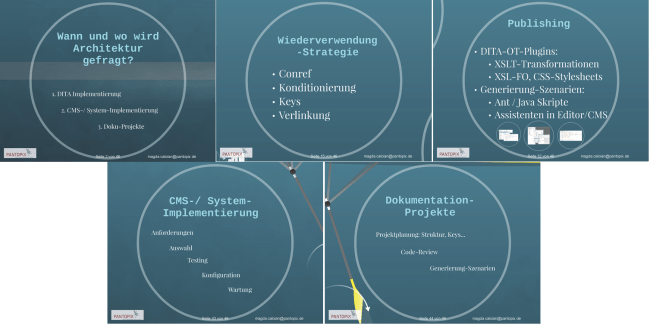
Mein Workshop – Das DITA-Implementierungsprojekt – und der Vortrag – Verstehen Sie DITA-Architektur? – haben erst am dritten Tag stattgefunden. Nichtdestotrotz waren sie gut besucht. Ich hätte mir gewünscht, dass die Workshopräume besser isoliert würden und jeder Teilnehmer einen Platz am Tisch hätte, sodass man bei den Übungen mitmachen konnte… So mussten wir Vieles überspringen, aber die Gruppe war trotzdem aktiv und stellte gute Fragen.

DITA Implementierung - Folien

Gleich danach dürfte ich mehr über DITA-Architektur im riesigen Plenum-Raum berichten… was so komisch auf mich wirkte, dass ich fühlte wie mein roter Faden dahinschwindet. Die Blokade war glücklicherweise nicht von Dauer, da gleich in der nechsten Woche habe ich noch einen Vortrag gehalten und es lief alles prima. Für den Teil über DITA-Architektur hatte ich eigentlich ebenso einen Workshop vorgeschlagen, dürfte aber diesmal nur einen Vortrag daraus machen. Vielleicht klappt es mit dem Workshop bei der Jahrestagung 2015 🙂 So würde ich meinem Publikum durch konkreten Beispielen und Übungen beibringen, was ich ihnen noch schulde.

DITA Architektur Folien

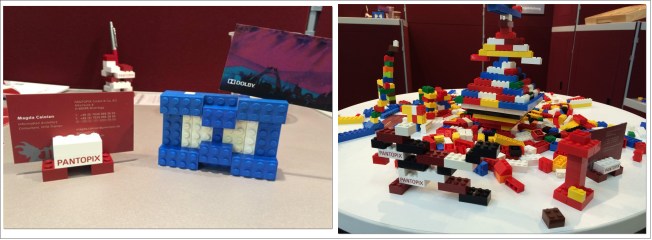
Darüberhinaus war ich in Stuttgart zum ersten Mal als Aussteller mit meinem neuen Arbeitgeber PANTOPIX dabei. Wir haben Freunde und Messebesucher eingeladen, mit uns über ihren Datenmodellen zu reden und dabei mit den Lego-Steinen zu spielen. Außer einer Reihe von Firmenlogos, entstanden ein paar einzigartige Objekte aus der Zusammenarbeit der Standbesucher. Danke fürs Mitmachen!

PANTOPIX Legosteine

Unknown's avatar

Spice up Your DITA Workflows – Flashback tekomRS

Part two of the flashback series recalls my prezi “about… DITA, of course” as @georgebina said, at the tekom Europe Roadshow in Bucharest.

The RoadShow story

After George has shown their efficient recipes for using DITA along the software documentation lifecycle at Syncro, I just suggested a few more spices to make a writer’s life a bit easier.

Sometimes it feels like the only constant in a technical writer’s work is change. Whether in agile or waterfall, project teams tend to place documentation towards the end of the process, or leave them at least one iteration behind. So after documentation is reviewed, approved, integrated in the kit and sent to translation, you notice the final seasoning: “minor” changes in the product right before the release. A modified label here, a moved button there… are exceptions to the “code freeze”.

Spice up your DITA workflows
But change is good, and you’re already at great advantage if using DITA. Indeed, you can make your documentation flexible and agile, by adding a few scripts to your DITA projects, to keep up with the changes in the products you are documenting.

Let’s see some examples for frequent updating of:
– strings in the user interface
– reference code
– application screenshots
– in-line code documentation


In the case of GUI strings, you can use keys in DITA, so that you wouldn’t have to worry about changes in all the topics. You just update the values in a keymap, or even use different keymaps in the same project, for different versions of the product.

<step>
   <cmd>Under <option keyref="mnu_sound-sch"/> select
     <uicontrol keyref="btn_nosound"/>.</cmd>
</step>

The special spice would be generating the keymaps on the fly, with a script like “ini2dita”, “csv2dita”, “xls2dita”… Talk to your developers and see how you can integrate the docs with the localization strings.


Keeping sources like the code samples, or 3rd-party licenses, in separate files, allows you to integrate them in your DITA content with coderef, increasing the flexibility of your projects.

<stepxmp>
   <codeblock outputclass="language-ini">
      <coderef href="codesample.bat"/>   
   </codeblock>
</stepxmp>

If you are using screenshots in your documentation, it is also best practice to refer to them by keys. Thus you can have separate sets of images for various product flavours and languages.

<stepresult>
   <image keyref="scn_sound-settings"/>
</stepresult>

Imagine you could even have the screenshots generated automatically. Wouldn’t that save a great deal of time? Tools like AutoHotkey and WinSpy might help.


Another advantage with DITA is you can apply an XSLT transformation of the in-line code documentation written by developers, like for example Python docstrings in rST, and even do the round-trip between rST and DITA formats. This method allows developers to keep writing in their favourite environment and you can even supply edited versions back to them in the same form. More about this in April at DITA NA in Chicago.

With these few seasoning ideas for your DITA workflows, you can save a lot of time and frustration when updating documentation projects, and you increase their accuracy and consistency. Give it a try!

Unknown's avatar

Implementing DITA – Workshop Flashback TCUK14

Finally catching up with my posts, starting a series of scrapbook-like articles about the events I attended in the past few months. I should be quick, as more events are coming soon…

Brighton Royal Pavilion

September 2014 in Brighton was the first time I attended TCUK. Met some old friends, made some new ones, ate good sushi, attended interesting sessions and I had a great group to work with in the DITA workshop.

The workshop theme was “Implementing DITA – The work beyond the business case”, aiming to briefly present each implementation phase, to understand what the project team would have to go through and what the project plan would look like.

Have you been told that implementing DITA or migrating to a structured authoring environment would take at least two years and a six-digit amount from your budget? That might be true, but you should understand what lies beyond the business case, in order to sustain your team effectively.

Let’s walk through the phases of the DITA implementation project together and see what the project plan contains, what new skills your team requires, which tasks you can prepare in-house, and how DITA tools and architecture can work best for you.

We’ll discuss and practice:

  • the implementation project plan
  • content inventory and analysis
  • information modelling
  • reuse strategy
  • DITA architecture
  • DITA templates
  • changes in the documentation workflow with new team roles

After attending this workshop, you will be ready to present the components of a DITA implementation package to your team. Only after getting their commitment and motivation, you can kick off a successful implementation.

Looking forward to TCUK15, here is my “storified” workshop report. Many thanks to the restless and enthusiastic John Kearney (@JK1440) who live-twitted the event.

Storify: Implementing DITA (Workshop TCUK14)

Click the photo to view the story of “Implementing DITA – The work beyond the business case” on Storify